Friday, February 24, 2012

App Google+ for BlackBerry 1.0.56


Google+ for BlackBerry® turns your BlackBerry® into the ultimate social networking device for connecting with your Google+ account while on the go.

Google+ for BlackBerry® makes sharing your pictures, thoughts and whatever else you want to share with your friends, family, co-workers and acquaintances a lot simpler.

Features:
- Circles let you determine who you are going to share information with. Create and view circles and add people to your circles using your BlackBerry®
- Photos lets you view your Google+ photos as well as the pictures of people in your circles.
- Visit the stream to get updates from your circles or see what people are saying nearby.
- Instant Upload automatically uploads photos to your own private album on Google+, making sharing a snap.
- Messenger is not included in the first version of Google+ for BlackBerry® but is coming soon!


Required Device Software
Smartphone: 5.0.0 or higher

More detail : BlackBerryApp World

Download OTA : Google+ 1.0.56

Memory Booster-RAM Optimizer 4.3.2 (UpDate)


Boosts your device speed by recovering wasted memory.

New in v4.3.2 :

  • Minor Update with Bug Fixes
  • New Interface background and Icon
  • Improved Stability and Perfomance

Features:
    * Optimizes BlackBerry® memory usage.
    * No device reset required. Therefore a lot faster than other applications!
    * No new hardware: Software only solution. No additional hardware needed! Does not influence any other applications.
    * Visuals: Fancy bar/line charts and textual high performance memory overview.   
    * Automatic Background Boosting: Make sure the BlackBerry® is never wasting memory!
    * Statistics: Extensive statistical data for effectiveness tracking.
    * How it works: If memory is wasted, MemoryBooster improves the memory management of the BlackBerry® Java Virtual Machine JVM which optimizes the device performance and stability. MemoryBooster recovers lost memory that is then free and can be assigned to running applications. You will see your applications running faster after using our  Boost Memory!  function. By simply hitting the  Boost Memory  button you can recover up to 12 MB or even more depending on your device.

Ubiquitous Rule: The more memory available the more memory your other applications can use and therefore, the faster these applications run.

Defining memory: MemoryBooster boosts only runtime memory. This means it improves the BlackBerry® s memory usage for running applications which has a positive effect on the overall speed of the BlackBerry®. MemoryBooster does not do anything with the media card memory which is the space for file storage only and would not have any effect on the speed of the phone anyway. Therefore, please do not compare our product with the  Options - Memory  listing of the BlackBerry®.  

Required Device Software
BlackBerry : 5.0 or higher

More Detail : BlackBerry App World

UpperText BlackBerry – AttaText


UpperText BlackBerry – AttaText is another fun text generator which convert a normal text into Text that create uniqueness. More important, this Apps is provided FREE, with monthly update required, which mean you need to download it again after one month usage.

As an example, the text “Hallo My Name is Atta” will be converted to attatext-sample :

attatext-sample

Is fun, isnt it?

Features
* FREE
* Convert to UpperText
* Small Size File (Only 10KB)
* Always Available Shortcut Menu
* Monthly Update

So why you not start install it in your BlackBerry, to get it,  justgo to a link below.

Download AttaText

Thursday, February 23, 2012

Twitter for BlackBerry smartphones 3.0


BBM Connected App Integration
Twitter for BlackBerry is now a BBM-connected app. When you connect Twitter with BBM, you can share your latest Tweet as your BBM Personal Message by simply selecting the Share with BBM icon when composing a Tweet. You can even access the Twitter app right from a BBM Profile by clicking on Twitter in the list of BBM-Connected applications.


New Tweet Layout
You’ll notice that we’ve made some changes to the appearance and layout of a Tweet on Twitter for BlackBerry so that greater emphasis is on a user’s full name and the Tweet is easier to read.


Twitter Photo Service Support
You can now upload your photos to Twitter’s photo sharing service when adding images to your Tweets. This is now the default photo service for Twitter for BlackBerry smartphones; however, you can opt to upload photos to other 3rd-party services in the Options menu.


Promoted Tweets
You may begin to see Promoted Tweets relevant to you in your timeline.  Promoted Tweets act just like regular Tweets and are clearly labelled as Promoted when an advertiser has paid for their placement on Twitter.

Note: Promoted Tweets are ordinary Tweets purchased by advertisers who want to reach a wider group of users or to spark engagement from their existing followers.


Improved Notifications for Wi-Fi Only Users
Users without a BlackBerry data plan will notice an increase in how often they receive Twitter notifications while in a Wi-Fi environment.

You can login to the BlackBerry Beta Zone and grab the latest using the link below.


Source : BlackBerry Beta Zone


Wednesday, February 22, 2012

Facebook for BlackBerry smartphones 3.0.0.6


Welcome to the Facebook for BlackBerry smartphones 3.0 Beta Program!

What’s New?

New features of Facebook for BlackBerry smartphones 3.0 include:

  • BBM Connected App Integration
  • New Facebook Publisher
  • Share with BBM Contact
  • UI Discoverability Improvements
  • Improved Facebook Notifications
  • User-Friendly Error Messages


You can login to the BlackBerry Beta Zone and grab the latest using the link below.

Facebook 3.0 BetaZone

BlackBerry Messenger Official 6.1.0.71


Get into BlackBerry® Messenger and express yourself – your way. Share your pin or unique barcode to connect with friends anywhere, anytime. Take comfort in knowing your friends are only a BlackBerry® Messenger message away whether you want to make plans for the night or ask a quick question. Chat and share funny stories, pictures, videos and more with individual contacts or groups of friends instantly. Even share app experiences with BBM-connected apps – so  that the things you love to do on your BlackBerry smartphone can now be shared.

Stay in touch like never before with BlackBerry® Messenger.
New on the latest version of BBM:

• Support for Animated Avatars - display pictures can now be animated!
• Enjoy a new selection of Emoticons
• Double the space to update your Personal Messages
• Customize the colour of chat bubbles for your contacts
• Simpler display picture update from the camera app – snap a picture and display it on BBM right away

Download :

When the download if the ads appear please wait 5 seconds and then press the 'Skip Ad'

Tuesday, February 21, 2012

Easy Smiley Pack 2.2.9 With BBM™ Connected !


The Easy Smiley Pack for BlackBerry® Messenger provides access to hidden smileys and emoticons right inside your BlackBerry® Messenger. Customize your BlackBerry® Messenger messages now and surprise your buddies! Also new is the BlackBerry® Messenger status customization, you can now add smileys and flags, and digits to your BBM status and profile name! This is a BBM™ Connected application.


Features:
* 630+ Smileys, flags, and ASCII art images in total now
* 250+ Smileys
* 210+ new country flags added
* 150+ ASCII art images added
* BlackBerry® Messenger status customization
* Digit to digit box translation
* Plugs into BlackBerry® Messenger through BBM™ Connected
* Complete instructions
* BlackBerry® Messenger can be launched out of application
* Easy usage


Note: These icons will even show up in your friend's BlackBerry® Messenger who does not have this app installed. Cool, right?

Minimum requirement: BlackBerry® Messenger 6.0.129 or above.


Required Device Software
BlackBerry : 5.0.0 or higher

Download OTA :

Easy Smiley Pack 2.2.9

Note :
When the download if the ads appear please wait 5 seconds and then press the 'Skip Ads'

Monday, February 20, 2012

ScreenShot 3.0.10 [Full] Now With BBM™ Connected !


With ScreenShot you can take a screen shot of your current BlackBerry® screen with just one click. This is a BBM™ Connected application.

Features:
- Takes a screen shot of your device and stores it on the SD card or device memory (if SD card is not available).
- Share screen shots via BBM™, send by email, or queue them for sending via email.
- You may assign ScreenShot to one of the convenience keys. Then from any screen, you may press the convenience key and the screen shot will be saved.
- Supported Image Formats: PNG, JPG, BMP, GIF, TIFF, WBMP.


How to use ScreenShot:
- Click the ScreenShot icon.
- ScreenShot will now take a screen shot of your current BlackBerry® screen.
- Screen shot image is stored in "Pictures" directory on your SD card (or internal BlackBerry® memory if the SD card is not available, i.e. device is connected to computer or there is not SD card installed)
- The BlackBerry® will vibrate once saving is completed.

Options:
- Accessible via "BlackBerry® Options" - "ScreenShot Options".
- Selectable "screen taken" notification: dialog, sound, vibration.
- Adjustable delay before screen shot is taken.
- File name conventions: custom prefix and suffix, current date and time can be added to the file name automatically.
- Automatic directory detection.
- Manual directory setting: i.e. screen shots can be stored in "media card - myVeryOwnScreenShots".


Required Device Software
Smartphone: 4.2.0 or higher

Download OTA :

ScreenShot 3.0.10

When the download if the ads appear please wait 5 seconds and then press the 'Skip Ad'
More Info


Foursquare 3.8 Released (OTA Link)


foursquare helps you explore the world around you. Meet up with friends. Find places to go. Save money with Specials.

While on the go, you can easily tell friends where you are, share pictures, get their comments ("I'm right around the corner, I'll stop by to say hello"), and get insider tips and reviews ("order the Lobster Ravioli; it's the best dish by far."). Tons of places offer discounts and freebies to the foursquare community, and you earn points and badges for doing the things you love.  If you want, you can easily post your proudest check-ins to Facebook or Twitter. It's like the old playground game, four square, but way more fun.

Foursquare for BlackBerry has updated to version 3.8 with a new explore 2.0 feature! Explore 2.0 helps you find out what is going around you, also in v3.8 are some UI tweaks added in the Me section.

Download OTA :

- Foursquare 3.8 for OS5
- FourSquare 3.8  for OS6-7

Sunday, February 19, 2012

SayIt 1.3.0 [BBM6 Integrated]


Want a Personal Assistant on your BlackBerry? Just say it with Say It!

SayIt is a Voice Recognition and Assistant software, so you can:

1. Ask anything you want and SayIt will answer you. For example: "How old is the earth?", "Who is Justin Bieber?", "1 plus 1 equals?", "Tell me about your self?",
"What's the weather like?",....and a lot more!
2. You can compose new Email , new Message, open BlackBerry Map, task, calendar,.... using your voice
2. You can Compose SMS, Email, BBM or any text typing use your own voice!
3. You can convert Text to Speech and download the converted text as *.mp3 format
4. You can convert Speech to Text and copy the text to send via BBM, SMS, MMS, Email,....

System requirements:
1. BlackBerry OS 5, 6, 7 and higher
2. Internet connecttion: BIS, BES, 3G, H+, EDGE, GPRS, Wifi and a direct TCP/IP
3. Alow all permissions (For OS5:Options - Device - Application Management - SayIt - Edit Permission - Connections (Allow), Interactions (Allow), User Data (Allow), For OS 6 and higher: Options - Advanced Options - Application Permission - SayIt - Edit permissions - Connections (Allow), Interactions (Allow), User Data (Allow))

How to use:
1. Voice Recognition: Press "SayIt" button then say a command you want.
2. Compose SMS, Email, BBM, text typing using your voice instead of typing: In any text input fields (for example: BBM chat box, new message, new SMS, new task,...) Press BlackBerry's Menu key, then choose "SayIt",
after that, a dialog box will show the text what you've said, press OK on the Dialog then you're done!
3. Text to Speech: Type or copy any text you want then Choose Voice - press SayIt button - Done!
4. Speech to Text: Choose record time - Press Record button - Done

Disclaimer:
1. Please use the Official OS
2. Fully restart after install SayIt
3. If you catch the error: "java.lang.IllegalStateException", restart your phone, then it will be OK!

Note !
This version 1.3.0, SayIt works via direct TCP/IP, so you must have an APN settings on your phone
To setup APN, go to Options -- Device -- Advanced System Setting -- TCP/IP -- APN then CHECK on the "APN setting enabled". If you have your network's APN, fill it on the APN field on this screen.
If you don't have your network's APN, contact your carrier, they'll send you the network APN.

Download :

SayIt 1.3.0

Tapatalk Forum App 1.4.7.2


Tapatalk is a mobile app built specifically for forum access. Different from mobile skin or mobile version that comes with the forum system, Tapatalk allows user to have a unified interface to access multiple forums at the same time. With million of Tapatalk users, your forum can be discovered by potential new members thru Tapatalk Network and our ranking and recommendation system.
Supported by 27000+ forums
Now available for BlackBerry®!

Major features:
- Auto-save your account information, no need to login every-time
- Super-fast loading of forums and topics
- Create,Read,Reply and Quote discussions
- Send and Receive Private Messages
- Attach files including pdfs,images and zip files
-Plus MORE!

Application is only for OS 5.0 and above.

Download :

Tapatalk 1.4.7.2

Love Battery by 7Langit


Item Description
Love Battery - Background Changing App

This half app-half theme has unique feature. It basically works like an app, you have got to install it and it basically runs in the background. The main feature is at the Homescreen, where the figures in the app will be moving accordingly to BlackBerry battery meter. When the battery is full they will be close to each other, while they move away from each other as the battery is dropping. It is like watching a story unfolds in your Homescreen.

Download :
- For OS5
- For OS6-OS7

Friday, February 17, 2012

Advance OS and LED 10.0

Item Description

* Read your messages (BBM,Email,SMS) without opening any app or even touching your phone.
* Know who is contacting you (BBM,Email,SMS,Call,Battery,Network and more) using just LED Light.
* Schedule repeated audible Alerts for BBM,Email,SMS,Missed Calls,Battery and more.
* Vibrate when pressing virtual or physical keypad.
* Prompt for call redial, and save unknown numbers after phone calls.
* Set Auto Loud Speaker and vibrate on call connect and more.
* Set call duration vibration reminders while in a call.


More Cool Features :
- Battery feature: Provides a sound profile for your battery status.
- Vibrates virtual & physical keypad when pressing keys.
- Screen Back-light control: keep screen light on for as long as you want when charging or in any menu.
- Alert Me sound profile: now you can be reminded about anything you miss on your phone, choose your own sound and vibration settings.


NEW features in v10.0 :
- Screen Capture (Screenshots). Take and share screenshots of your mobile screen easily and with no watermarks.
- Custom App LED (App keys), GET or SHARE Custom App LED Keys with your friends
- App font will use mobile system font.
- New UI for LED, BBM and Popups features.
Also there are many fixes and other small enhancements.

Required Device Software
BlackBerry : 4.7 or higher


More Detail : http://www.alsooz.com/

Running Apps Info 2.1.0

 Item Description

With the Running Apps Info, you can see the list of all the running applications on your device with just one click! Now stay informed about all the applications running on your device and save battery.
For example; You were using GPS app and you forgot to close it. In that case the battery will start discharging.


Features:
  • Easy to use.
  • It gives info about the apps in the form of pop up.
  • It saves battery.
With the help of this app,you will be able to know which app is running in the form of pop up so that you can close it and save your battery.

Compatible with all BlackBerry OS 4.3 & above.


Memory Info


Memory Info


Shows you the Memory Info of your device such as Device Memory, SD Card, Flash, RAM.
Memory Info is for those who are constantly worried and checking their available memory, but also those who want to make sure their old calendar events, call logs, and e-mails don't get deleted because their memory dropped too low when they weren't watching.

Compatible with BlackBerry all OS 4.2.1 & above.


Easy Lock Pro 1.2 - Slide up to unlock your phone


Item Description

Easy Lock Pro - Slide up to unlock your phone
Easy Lock is the easiest way for locking / unlocking your phone. Quick. Smooth. Elegant.
Eliminates the cases of accidental screen or key presses! No more unwanted phone calls or battery drain because of WiFi or GPS turned on by mistake!

Features:

- Works directly with the native BlackBerry® lock button
- Automatically locks when your backlight goes off
- Unlock is as easy as swiping with your finger
- Zero initial configuration
- Starts automatically when your BlackBerry® is powered on and runs silently in the background. However, you can easily turn it off at any time.
- Configurable background. Use one of the backgrounds coming with the application or select a picture from your device memory / SD card.
- Configurable sound effects
- Customizable widgets: clock, notifications (new emails, SMS, BBM etc.), battery level and signal strength.
- Option to disable auto locking on certain applications (either native or third-party). Very convenient for browsers, maps, readers and others.
- Option to lock during phone calls
- Works for non-touch screen devices as well (just use your trackpad)


Required Device Software
Smartphone: 6.0.0 or higher


Thursday, February 16, 2012

PicMix 2.1.1 (UpDate)


Item Description
A picture is worth a thousand words, but multiple pictures in fancy frames and text caption, is worth a MILLION stories and awesomeness. With PicMix, you can combine your favorite photos into frames, adjust the photos, add text caption (just like comic book!) and share it to your friend on facebook, twitter and even set it as your BBM™ profile pictures. Start PicMixing now, its totally FREE and FUN!

Required Device Software
BlackBerry : 5.0.0 or higher

Download PicMix : OTA

Monday, February 13, 2012

BerryPopup 1.5.15 - Preview Messages the Moment They Arrive!


Preview Messages the Moment They Arrive!
BerryPopup is the easiest way to preview incoming e-mail and SMS messages the moment they arrive. See what is happening without switching away from what you are currently doing.
 
Features :
  • Preview incoming e-mails/alerts.
  • Open inbox, reply, forward, mark as read and delete e-mails right from the popup.
  • Open inbox, reply and forward SMS right from the popup.
  • Support for CrackBerry.com and Bellshare.com forum notifications (reformats forum notificiation e-mails for easier legibility).
  • Option to automatically delete forum notification mails.
  • Disable popups until backlight dims or for a certain time right from the popup.
  • Customize order of messages (Oldest first, Newest first).
  • Only show popups for messages from contacts you have in your phonebook.
  • Customize positioning of the popup ("System Default", "Bottom of screen" or "Stretch to the borders of the screen").
  • Customize position of the button bar (left, right, top, bottom, no buttons).
  • Automatically turn on backlight when a message comes in.
  • Auto-dismiss popup after specified time.
  • Disable popups while in the messaging application.
  • Disable while device is locked so you will not be flooded with popups after unlocking.
  • Disable popups while backlight is on.
  • Show contact photo and customize its size.
  • Customize font sizes.
  • Backup/Restore to memory card.
  • Integrates with SmartAlerts for absolute control which messages trigger popups and which don't.
Download BerryPopup 1.5.15 (Free 7 Day Trial, OS 4.2.1)
Download BerryPopup 1.5.15 (Free 7 Day Trial, OS 4.7)
Download BerryPopup 1.5.15 (Free 7 Day Trial, OS 5.0)
Download BerryPopup 1.5.15 (Free 7 Day Trial, OS 6.0)
Download BerryPopup 1.5.15 (Free 7 Day Trial, OS 7.0)
 

Thursday, February 9, 2012

Junk Call Blocker Pro 1.0.313 by S4BB Limited


Description

Brand New Release!

Junk Call Blocker Pro is a smart application that adapts from your call list to allow you to select specific phone numbers to block. Save yourself the headache of having to deal with junk calls by blocking them with this app! This Pro version allows you to block an unlimited amount of numbers.

Feature Overview:
  •  Two Modes: autoblock junk call (default setting), show warning only on an incoming junk call.
  •  Junk Call Blacklist (add numbers to this list and they will be blocked).
  •  Whitelist (overrules any number in the blacklist).
  •  Block History.
  •  Block Numbers Via: call log, last short call (less than 10 seconds), manual number input.
  •  Block Feedback: get notifications once a phone call had been blocked.
  •  BBM™ integration: share junk call numbers and Junk Call Blocker activity via BBM™.
Required Device Software
BlackBerry : 6.0.0 or higher

Compatible Devices :
BlackBerry: 9570, Bold 9650, Bold 9700, Bold 9780, Bold 9788, Bold 9790, Bold 9900, Bold 9930, Curve 9300 3G, Curve 9330 3G, Curve 9350, Curve 9360, Curve 9370, Curve 9380, Pearl 9100 3G, Pearl 9105 3G, Porsche Design P’9981, Style 9670, Torch 2 9810, Torch 2 9850 / 9860, Torch 9800

Download OTA : Junk Call Blocker Pro

Download Desktop : (Zip)


Photo Booth v2.4.12 - Share Cool Photos on BBM™

Item Description

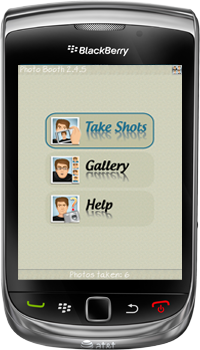
Have you ever wanted to have a fun photography application on your BlackBerry® device? Photo Booth is inspired by those public photo booths where people can take their passport pictures. Like a film strip, the four photos are shown consecutively on a vertical strip.

To use this application, simply open the application and select the "Take Shots" button. You can choose the frame color for your pictures and then your device's camera will then take four consecutive pictures (with flash). After all four pictures have been taken, they are put together as one image on a vertical strip with a colored frame.

This is a fun app for those who like to take pictures and have them woven together as one image. Photo Booth is a BBM™ Connected application!

Features:
- Takes 4 pictures in a row
- Takes the pictures by itself, just hold still and make a funny face
- Photos saved in Photo Booth Style
- Quick overview and zoom mode in gallery
- BBM™ Connected
- Easy in use & light weight

Required Device Software
BlackBerry : 5.0.0 or higher

Download OTA : PhotoBooth 2.4.12

Passcode Lock Pro - 2 in 1 - slide to unlock and passcode

Item Description

Protect your BlackBerry® with style: slide and passcode. This is the perfect combination, just slide and type your password - beautiful, simple and secure. Give your BlackBerry® a different look!

Features:
- Option to drag down or slide right before unlock
- Works directly with the native BlackBerry® lock button
- Automatically locks when your backlight goes off or after a configurable delay
- Zero initial configuration
- Starts automatically when your BlackBerry® is powered on and runs silently in the background. However, you can easily turn it off at any time.
- Locks out the device after configurable number of failed attempts. The lockout time is customizable too. Great against intruders.
- Forgotten password mechanism
- Emergency call support
- Own optimized keyboard for easier typing of your passcode on touchscreen devices
- Configurable background. Use one of the backgrounds coming with the application or select a picture from your device memory / SD card.
- Configurable sound effects
- Customizable widgets: clock, notifications (new emails, SMS, BBM etc.), battery level and signal strength.
- Option to disable auto locking on certain applications (either native or third-party). Very convenient for browsers, maps, readers and others.
- Works for non-touch screen devices as well

Required Device Software
BlackBerry : 6.0.0 or higher

Download OTA :  Passcode Lock Pro


Wednesday, February 8, 2012

e-Mobile Today Professional Edition

Item Description

2009 BlackBerry Venture Fund Competition Finalist
2009 Handango BlackBerry Product of the Year Champion Award
2009 CTIA AT&T Competion Finalist
2010 BlackBerry Venture Fund Competition Reginal Semi-Finalist

Next generation all-in-one PIM management!  contacts, tasks, appointment, calls, email, sms . Add more with news, stocks, weather add-ons. Revolutionize BlackBerry® Today!

* Contact, Appointment, Tasks, Emails, Calls, Date & Time all in one PIM management.
* At-a-glance view of missed calls.
* View missed calls by day of the week.
* Make call directly by pressing the highlighted number.
* Manage all your contact from the front screen.
* Making calls, send emails to contact with press of a button.
* Locate contact quickly by press of the keypad.
* View today  s agenda at a glance.
* View all day appointments with appointment time, reminder and reoccurrence status.
* View 4 days of upcoming appointments right from your home screen.
* View upcoming appointments by week.
* View appointment calendar for quick overview.
* View today  s tasks on home screen on home screen.
* View tasks by priority, due date & time, completion status and more.
* View 3 days of upcoming tasks right from your home screen.
* View upcoming tasks organized by categories.
* View task calendar for quick overview.
* View unread emails by senders and subjects without leaving the home screen.
* View emails details with a single click.
* Personalize today screen with your own theme by importing your personal pictures!
* Add more with e-Mobile Today News plug-in, e-Mobile Today Stock plug-in and e-Mobile Today weather plug-in.  (Choose "Setting" page and make sure the plug-ins are checked after installation)

Required Device Software
BlackBerry : 4.5 or higher

Download OTA : e-MobileTodayPro

Tuesday, February 7, 2012

Photo Studio 0.9.8.26


Photo Studio 0.9.8.25 is released with PicFrames add-on and Valentine's Day Frames pack.

Item Description

Photo Studio for BlackBerry® is utilized by both amateur and professional photographers who seek simple, but powerful image processing on-the-go. Users can turn their BlackBerry® into a fantastic photo editing studio that allows them to mix operations, frames and effects.

Main features:
- BBM Connected! Share your photo directly from Photo Studio.
- Base photo operations: brightness, contrast, RGB color adjustment, hue, saturation and many more.
- Transform operations: resize, rotate, crop.
- 75 unique effects in categories: ‘Simple toning’, ‘Old Style’, ‘Vintage’, ‘Summer mood’, ‘Sketch’, ‘Lomo’, ‘Blur’ and ‘Art’.
- A set of frames. Apply set of beautiful digital frames to your photos. Available packs: ‘Christmas Frames 1’, ‘Christmas Frames 2’ and ‘Frames Pack 1’.
- PicFrames helps you combine multiple photos into amazing looking frames.
- Combine operations: Apply single or multiple effects to one image.
- Several output formats: Save the result in different formats: ‘Small’, ‘Normal’, ‘Large’ and ‘Original’.
- Share photos with Facebook, Twitter and Messages applications installed on BlackBerry.
- PRO version includes unlocked packs ‘Effects Pack 1’, ‘Frames Pack 1’, 'Christmas Frames 1', 'Christmas Frames 2' and PicFrames.

Download OTA Photo Studio :

Photo Studio 0.9.8.25 ( UpDate)


Photo Studio 0.9.8.25 is released with PicFrames add-on and Valentine's Day Frames pack.

Item Description

Photo Studio for BlackBerry® is utilized by both amateur and professional photographers who seek simple, but powerful image processing on-the-go. Users can turn their BlackBerry® into a fantastic photo editing studio that allows them to mix operations, frames and effects.

Main features:
- BBM Connected! Share your photo directly from Photo Studio.
- Base photo operations: brightness, contrast, RGB color adjustment, hue, saturation and many more.
- Transform operations: resize, rotate, crop.
- 75 unique effects in categories: ‘Simple toning’, ‘Old Style’, ‘Vintage’, ‘Summer mood’, ‘Sketch’, ‘Lomo’, ‘Blur’ and ‘Art’.
- A set of frames. Apply set of beautiful digital frames to your photos. Available packs: ‘Christmas Frames 1’, ‘Christmas Frames 2’ and ‘Frames Pack 1’.
- PicFrames helps you combine multiple photos into amazing looking frames.
- Combine operations: Apply single or multiple effects to one image.
- Several output formats: Save the result in different formats: ‘Small’, ‘Normal’, ‘Large’ and ‘Original’.
- Share photos with Facebook, Twitter and Messages applications installed on BlackBerry.
- PRO version includes unlocked packs ‘Effects Pack 1’, ‘Frames Pack 1’, 'Christmas Frames 1', 'Christmas Frames 2' and PicFrames.

Download OTA Photo Studio :

Monday, February 6, 2012

Unlock Pro - Slide, Pull, Touch to Unlock


Item Description

The most professional unlock app at BAW! Include 3 gorgeous unlock styles - slide unlock, pull down unlock and touch unlock! All are with the leading high quality UI, clean layout and it is really easy to use, will never slow down your system. The must have app at your BlackBerry®
Features:
1. 3 unique unlock style, all are really cool;
2. All elements are high quality;
3. Very easy to operate and friendly UI.

Promotion:
Free now and forever !! If need to unlock full version, please leave your encouraging comments at App World and then kindly email us at cs@mmmooo.com your phone PIN and "Unlock Pro" at the mail subject. We will help you to register!!

Download OTA :

Unlock Pro v1.0.0 for 480x640 (OS7.0)
Model: Torch 2 9810

Unlock Pro v1.0.0 for 480x800 (OS7.0)
Model: Torch 9850/9860

Unlock Pro v1.0.0 for 480x360 (OS5.0-7.0)
Model: Curve 8900, Curve 8910, Curve 8980, Tour 9630, Bold 9650, Bold 9700, Bold 9780, Bold 9788, Curve 9350, Curve 9360, Curve 9370, Bold 9790

Unlock Pro v1.0.0 for 480x320 (OS5.0)
Model: Bold 9000 , 9020

Unlock Pro v1.0.0 for 360x480 (OS5.0-7.0)
Model: Storm 9500/9530, Storm2 9550/9520, Torch 9800, Curve 9380

Unlock Pro v1.0.0 for 360x400 (OS5.0-6.0)
Model: Pearl 9100 3G, Pearl 9105 3G, Style 9670

Unlock Pro v1.0.0 for 320x240 (OS5.0-6.0)
Model:Curve 8520, Curve 8530, Curve 9300 3G, Curve 9330 3G


Popular Posts